Centralized Notice Tracking
Track and monitor GST notices across multiple GSTINs from one unified dashboard.
Spectrum Cloud Enterprise brings GST reconciliation across multiple registrations into one consolidated PAN-level view — with detailed reconciliation across books, returns, invoices and ITC.
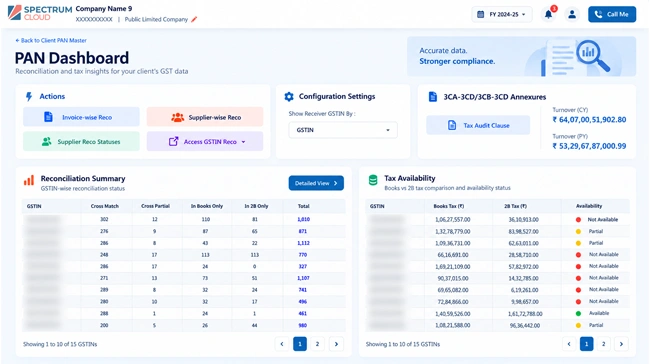
PAN Dashboard — Summary View, Spectrum Cloud Enterprise by KDK Software
PAN-Level GST Reconciliation brings multiple GST registrations associated with the same PAN into a consolidated reconciliation view. Instead of reviewing every GSTIN in isolation, finance and tax teams can monitor reconciliation across registrations while retaining access to GSTIN-, supplier- and invoice-level details.
One organization can have multiple GST registrations, branches and purchase datasets. When reconciliation is handled registration by registration, teams can lose the broader picture across the organization.
Separate reconciliation workflows
Fragmented Visibility
The PAN Dashboard brings all GSTINs linked to your PAN into one place, so you can view your GST data together or drill down into individual GSTINs and transactions.
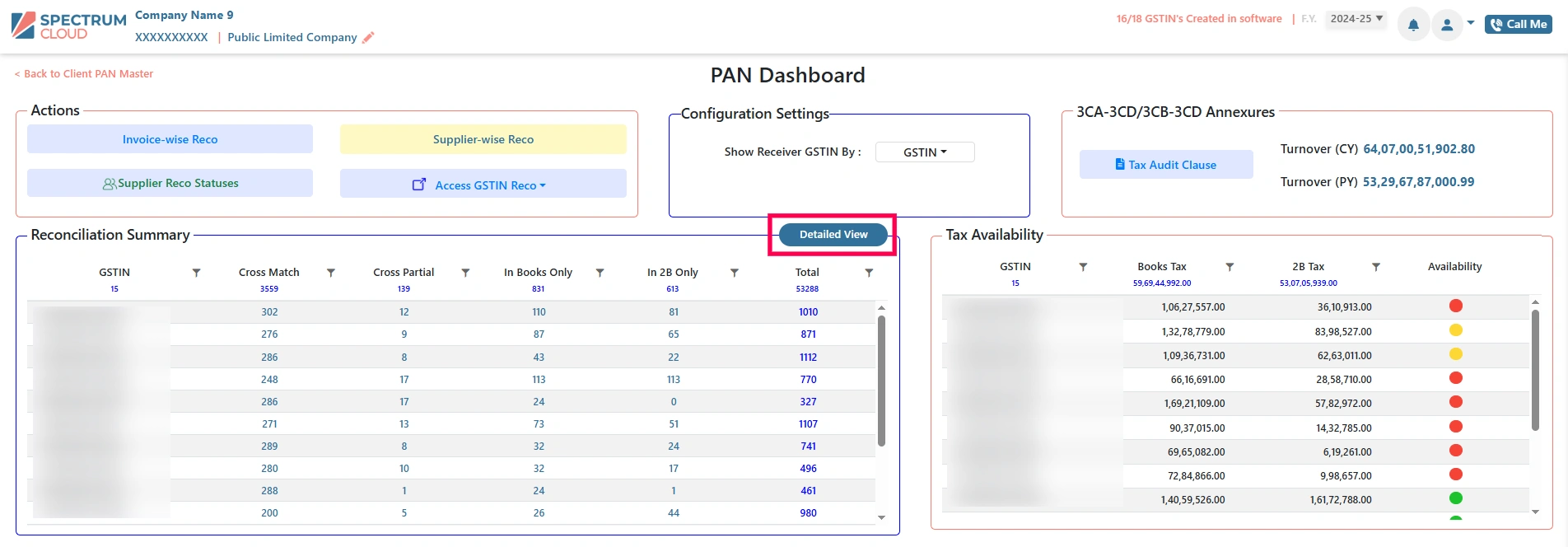
PAN Dashboard — Summary View
Every company mapped to a PAN is listed together, with software records checked against the GST portal before reconciliation begins.
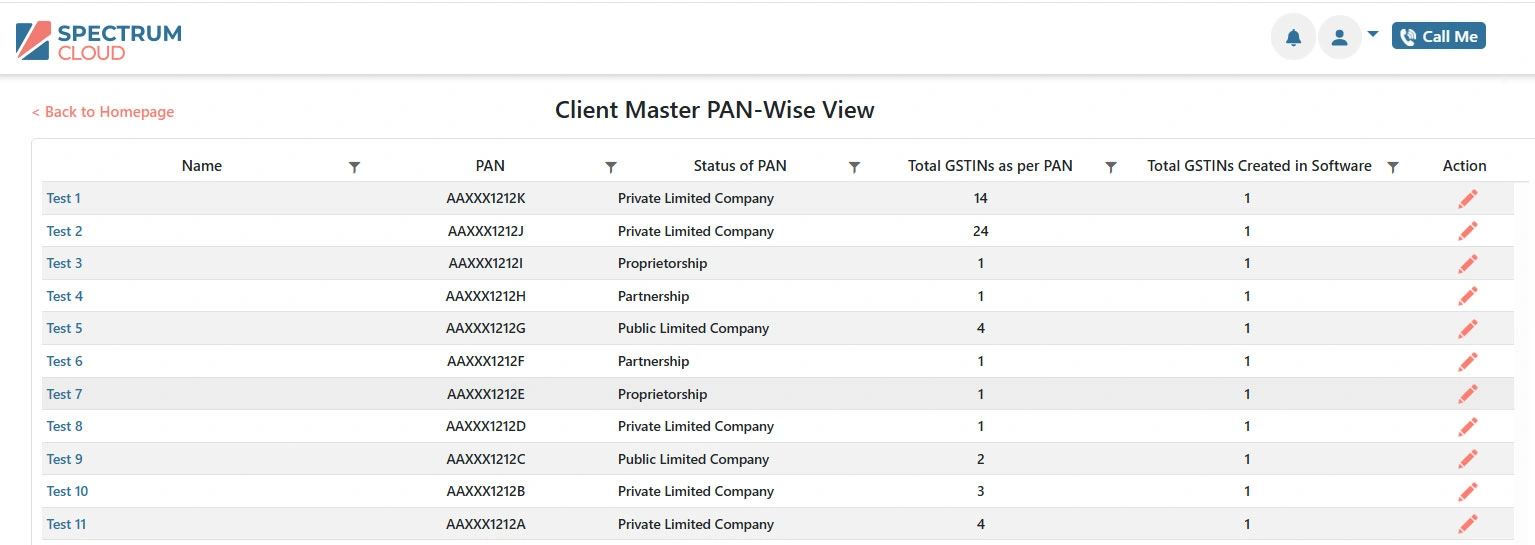
View GST registrations associated with a PAN from a consolidated reconciliation perspective.
Start with consolidated results and move into detailed reconciliation information when investigation is required.
Review invoice-level reconciliation information and identify records requiring attention.
Analyze reconciliation by supplier to understand where differences are concentrated.
Move from PAN-level visibility into individual GSTIN details without losing the broader context.
Generate downloadable reconciliation reports for further analysis and record-keeping.
Spectrum Cloud Enterprise supports invoice-wise and supplier-wise reconciliation, GSTIN reco, and a consolidated results summary — the same screens your team works in.
Organization identifier
Individual registration
Vendor-level records
Transaction-level detail
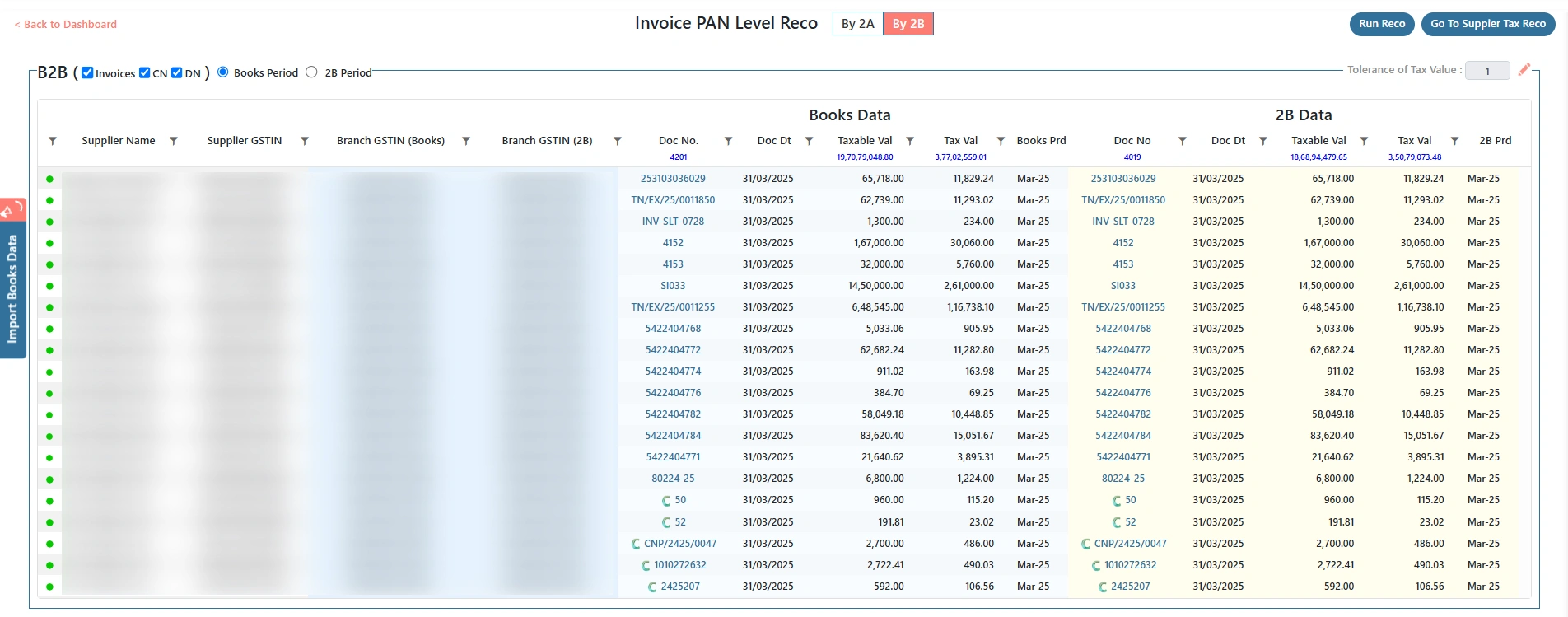
Invoice-Wise Reconciliation — Detail
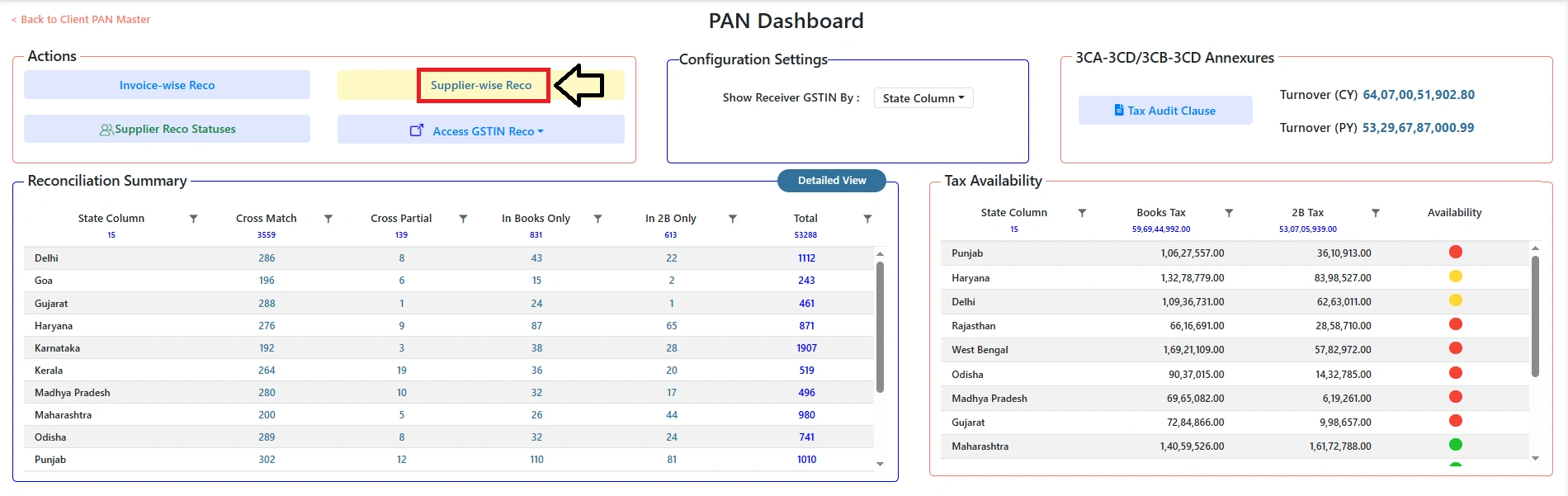
Supplier-Wise Reconciliation
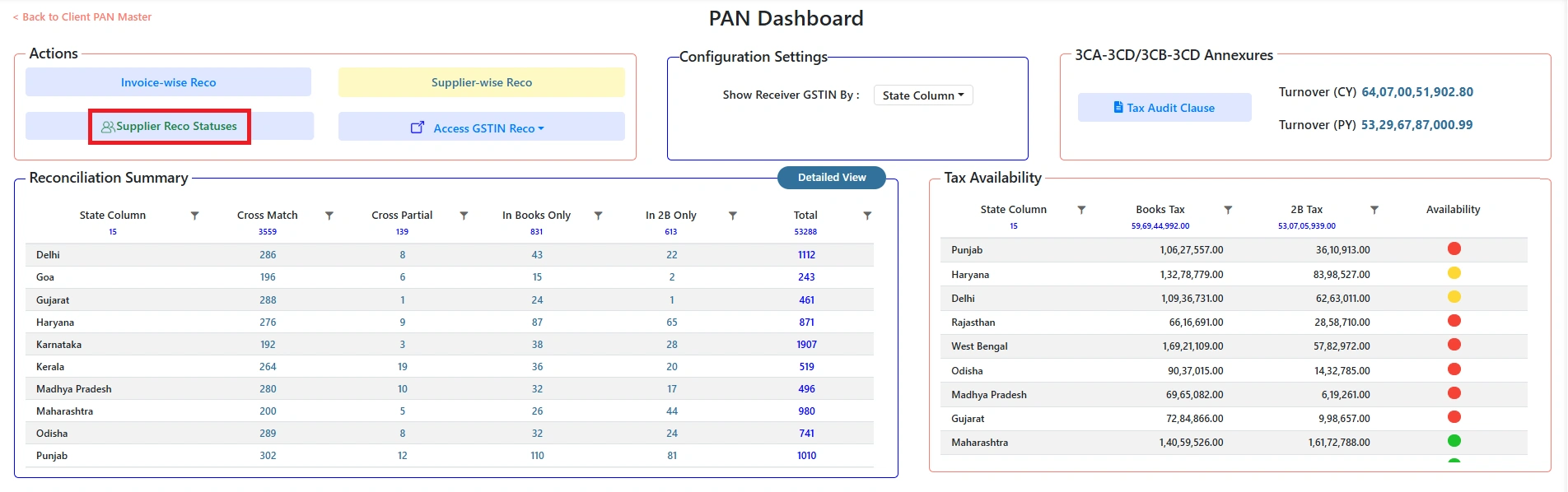
Reconciliation Status Categories
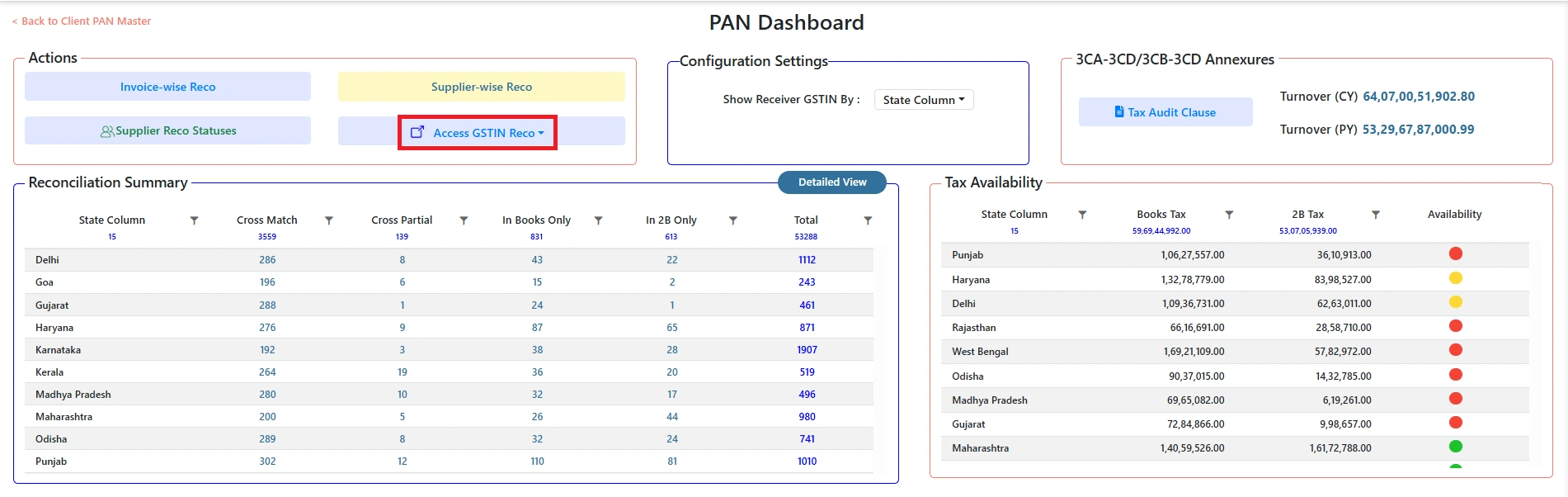
Access GSTIN Reconciliation
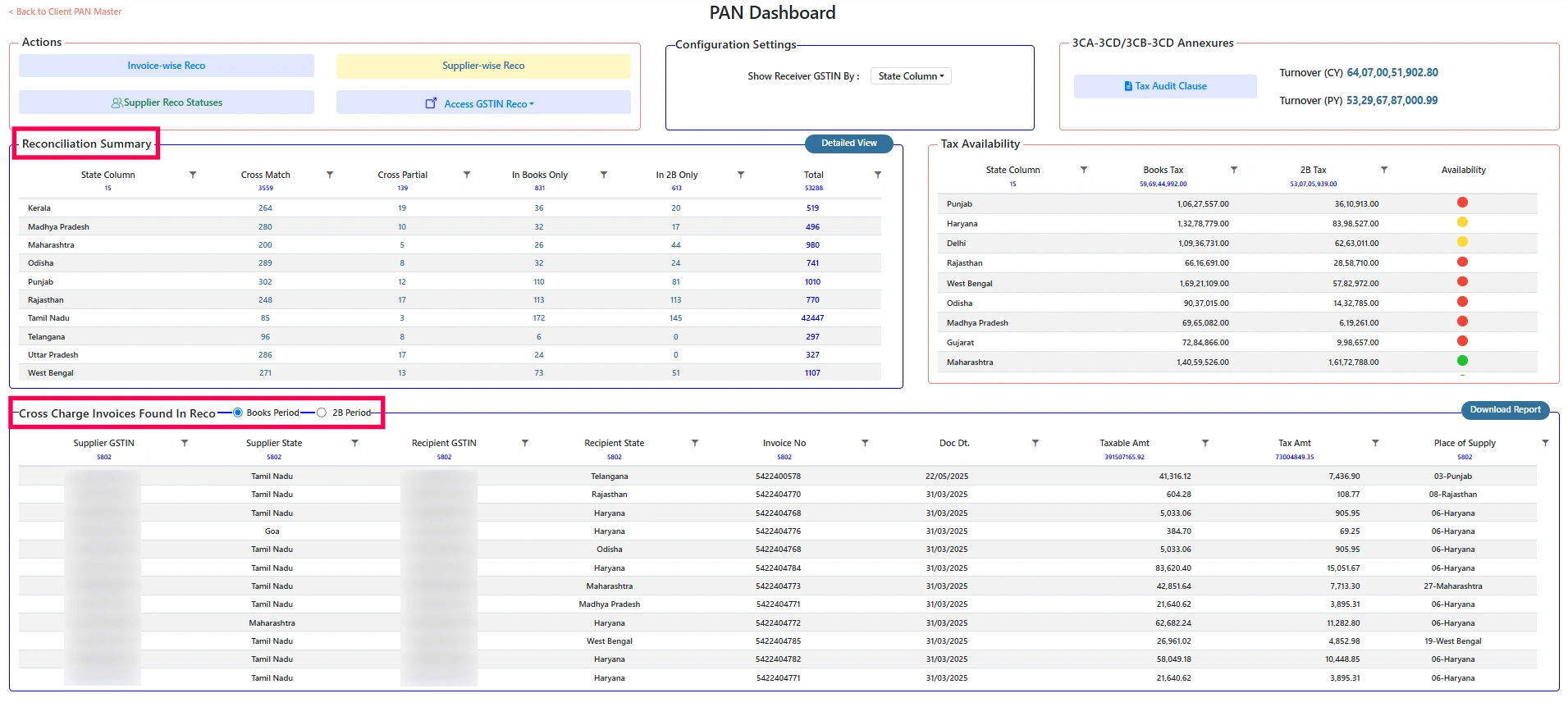
Reconciliation Summary
Handles broader GST reconciliation workflows across relevant datasets and transaction sources.
Provides a consolidated perspective across GST registrations associated with the same PAN, with drill-down into GSTIN, supplier and invoice details.
PAN-Level GST Reconciliation is the consolidated enterprise view, supported by a complete suite of GST reconciliation workflows across books, returns, invoices, ITC, E-Way Bill and IMS.
Multi-dimensional reconciliation of purchase data against GSTR-2A and GSTR-2B.
Compares ITC claimed in GSTR-3B against 2A, 2B and books, with month-wise and tax component-wise variance tracking.
Annual reconciliation with a mismatch summary across three dimensions.
A simple 6-step process to bring all your GST data together and get complete visibility.
Identify the PAN and associated GST registrations.
Enter the PAN to instantly fetch all the GST registrations linked to it. This gives you a complete starting point for reconciliation.
| GSTIN | Legal Name | State | Status |
|---|---|---|---|
| 07ABCDE1234F1Z5 | ABC Enterprises Pvt Ltd | Delhi | Active |
| 24ABCDE1234F2Z4 | ABC Enterprises Pvt Ltd | Gujarat | Active |
| 27ABCDE1234F1Z3 | ABC Enterprises Pvt Ltd | Maharashtra | Active |
| 29ABCDE1234F2Z1 | ABC Enterprises Pvt Ltd | Karnataka | Active |
| # | GSTIN | Legal Name | State | Registration Type | Status |
|---|---|---|---|---|---|
| 01 | 07ABCDE1234F1Z5 | ABC Enterprises | Delhi | Regular | Active |
| 02 | 24ABCDE1234F2Z4 | ABC Enterprises | Gujarat | Regular | Active |
| 03 | 27ABCDE1234F1Z3 | ABC Enterprises | Maharashtra | Regular | Active |
| 04 | 29ABCDE1234F2Z1 | ABC Enterprises | Karnataka | Regular | Active |
| GSTIN | Total | Matched | Mismatched | Pending | Status |
|---|---|---|---|---|---|
| 07ABCDE1234F1Z5 | 32,450 | 24,112 | 6,321 | 2,017 | Completed |
| 24ABCDE1234F2Z4 | 48,120 | 34,552 | 9,881 | 3,687 | Completed |
| 27ABCDE1234F1Z3 | 55,286 | 42,118 | 12,004 | 1,164 | Processing |
| GSTIN | Matched | Mismatch | Pending |
|---|---|---|---|
| 07ABCDE1234F1Z5 | 24,112 | 6,321 | 2,017 |
| 24ABCDE1234F2Z4 | 34,552 | 9,881 | 3,687 |
| 27ABCDE1234F1Z3 | 42,118 | 12,004 | 1,164 |
| GSTIN | Legal Name | Total | Matched | Mismatch | Pending | Action | |
|---|---|---|---|---|---|---|---|
| ⌄ | 07ABCDE1234F1Z5 | ABC Enterprises | 32,450 | 24,112 | 6,321 | 2,017 | View Details → |
Suppliers (6,321)Invoices (6,321) | |||||||
| › | 24ABCDE1234F2Z4 | ABC Enterprises | 48,120 | 34,552 | 9,881 | 3,687 | View Details → |
| › | 27ABCDE1234F1Z3 | ABC Enterprises | 55,286 | 42,118 | 12,004 | 1,164 | View Details → |
Download detailed reconciliation information for further analysis and review.
| GSTIN | Total Invoices | Matched | Mismatched | Pending |
|---|---|---|---|---|
| 07ABCDE1234F1Z5 | 32,450 | 24,112 | 6,321 | 2,017 |
| 24ABCDE1234F2Z4 | 48,120 | 34,552 | 9,881 | 3,687 |
| 27ABCDE1234F1Z3 | 55,286 | 42,118 | 12,004 | 1,164 |
See reconciliation across registrations associated with a PAN from one broader perspective.
Reduce the need to approach every GSTIN as an entirely isolated reconciliation exercise.
Identify registrations and records requiring further review.
Retain registration-level visibility while working from a consolidated view.
Move from organization-level visibility to detailed transaction information.
Generate PAN-level reconciliation reports for review and record-keeping.
GST reconciliation software supports organizations that manage reconciliation across books, returns, ITC and more than one GST registration.
Centralized visibility across GST registrations operating in different states.
Review branch-level GST reconciliation from a broader organizational perspective.
Manage reconciliation across multiple registrations with a centralized tax function.
Review books, returns and ITC reconciliation from one broader picture while retaining detailed analysis.
Spectrum Cloud Enterprise lets you export PAN-level reconciliation data in Excel format, invoice-wise or supplier-wise, on a monthly or annual basis. Here is the actual workflow, screen by screen.
Log in to Spectrum Cloud Enterprise and navigate to the PAN-Level Dashboard section.
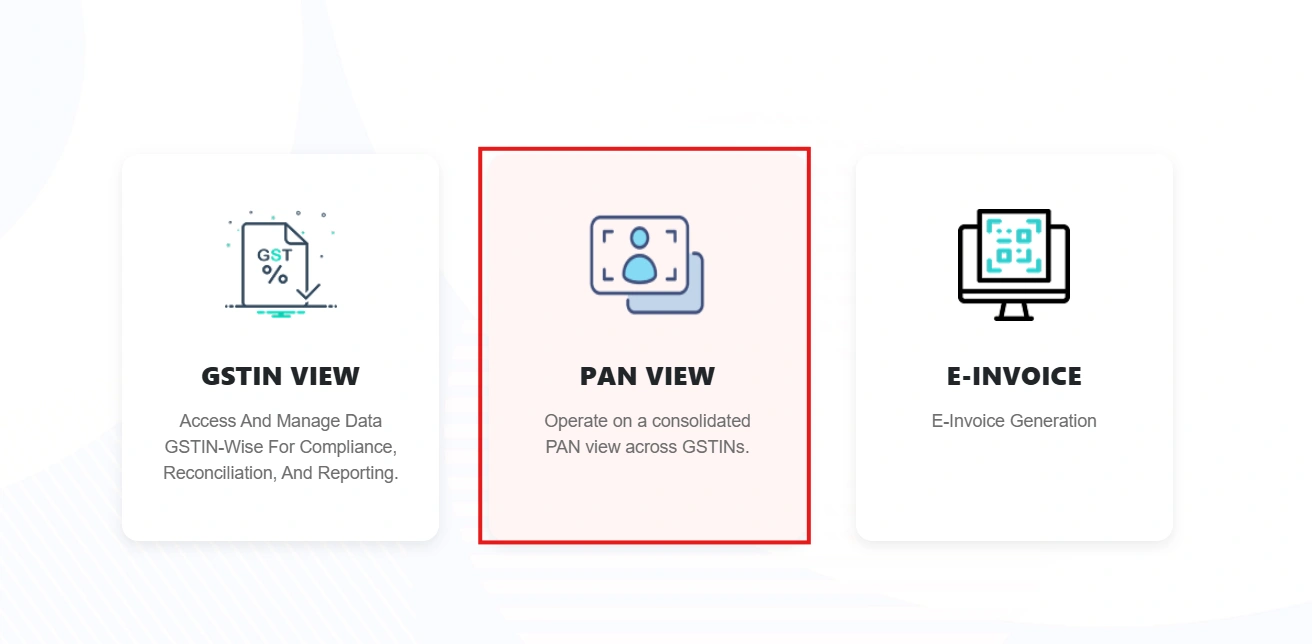
Choose the company under the PAN for which the reconciliation report is to be generated.
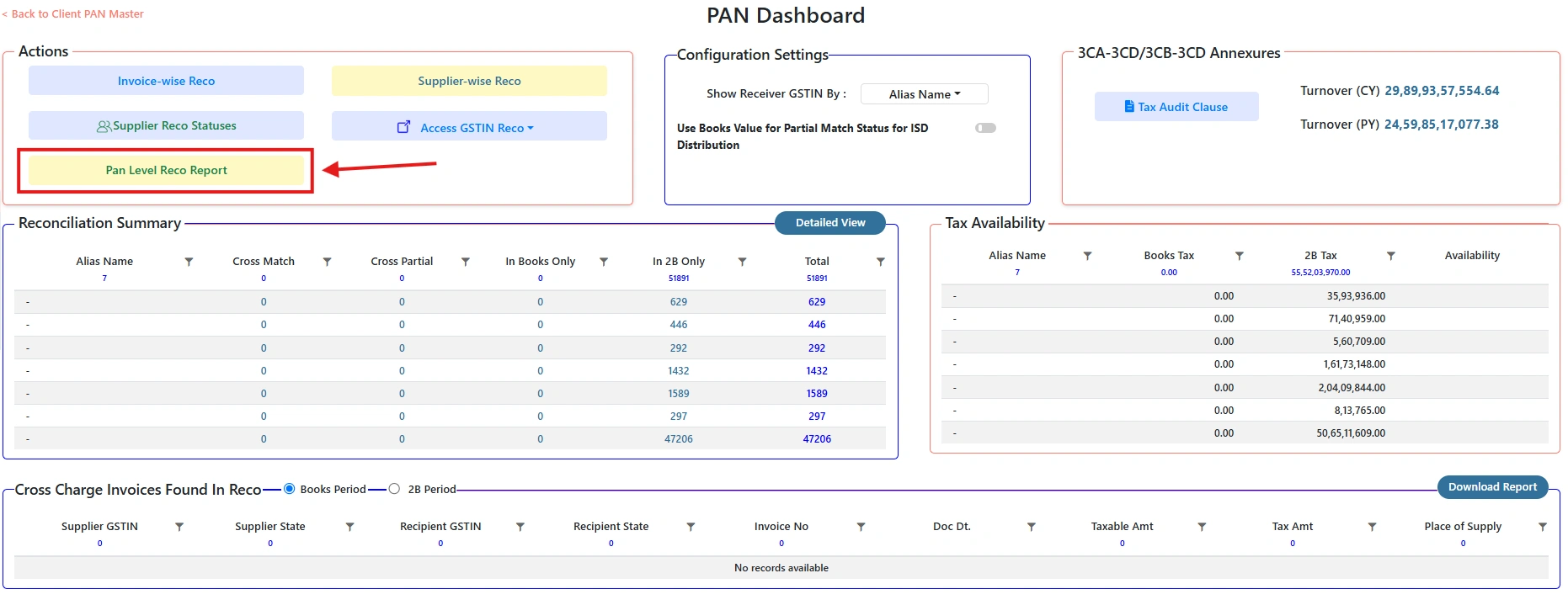
From the Actions menu, select the PAN Level Reco Report option.
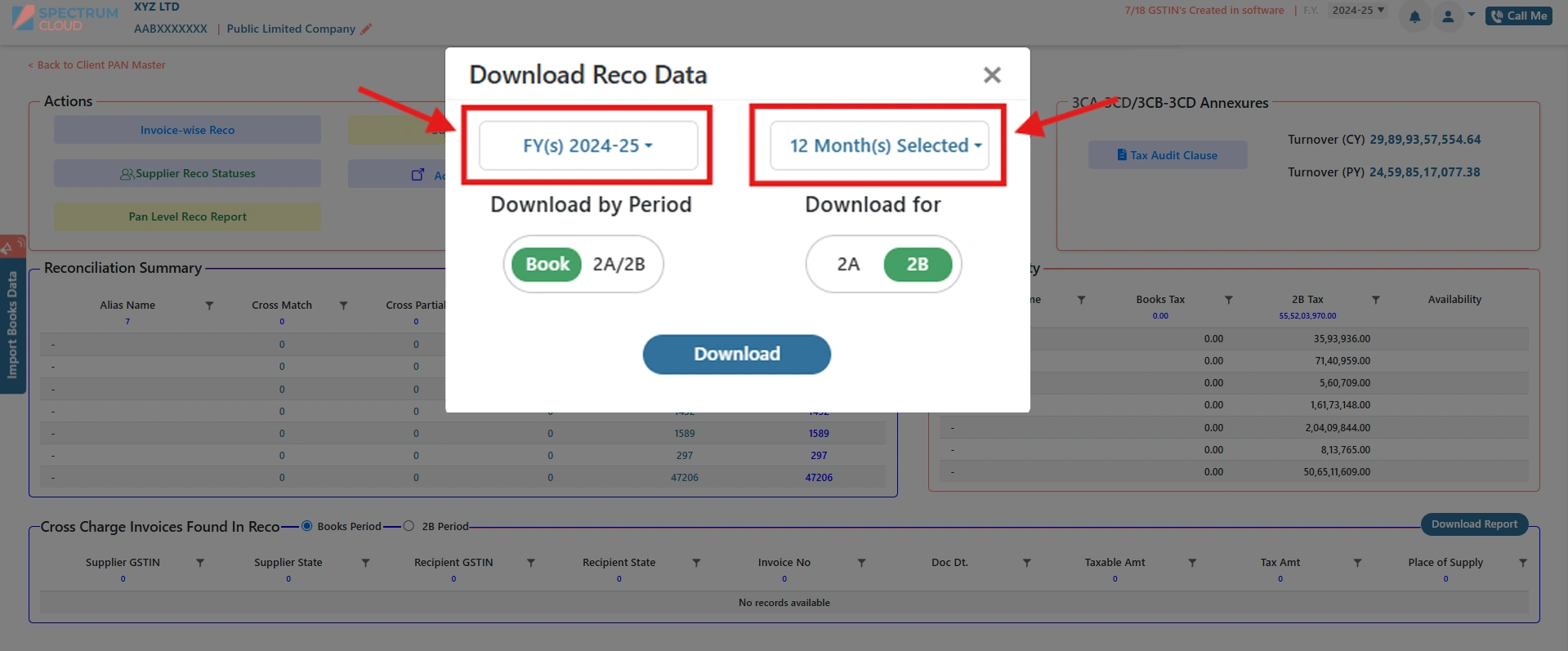
Select the financial year or month the report should cover.
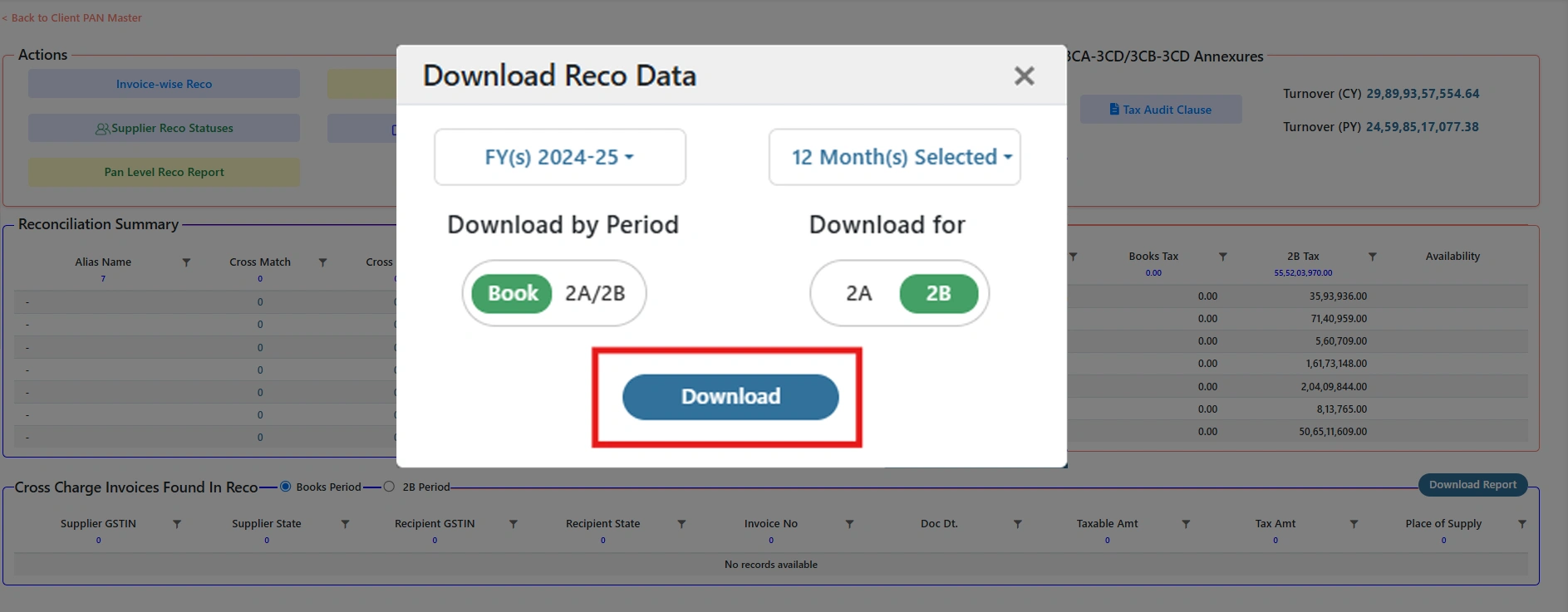
Export the selected data as an Excel file, ready for verification and record-keeping.
Report availability and formats may vary by product configuration.
GST NOTICE & ORDER MANAGEMENT
Keep notices, orders and compliance records across multiple GSTINs organized in one place — with a consolidated PAN-level view for easier monitoring and management.
Track and monitor GST notices across multiple GSTINs from one unified dashboard.
Manage notices and orders across all GST registrations linked to your PAN.
Keep notices, orders, responses and related records organized for easy review and retrieval.
Frequently asked questions about KDK Software.
PAN-Level GST Reconciliation brings multiple GST registrations associated with the same PAN into a consolidated reconciliation view, so finance and tax teams can monitor reconciliation across registrations while retaining access to GSTIN-, supplier- and invoice-level details.
GSTIN-level reconciliation reviews one registration in isolation. PAN-level reconciliation adds a consolidated perspective across all GST registrations linked to a PAN, without removing the ability to drill down into any individual GSTIN.
Organizations with several registrations, branches or states often review reconciliation separately for each GSTIN, which fragments visibility. PAN-Level Reconciliation brings these registrations into one organizational view.
It identifies the PAN and its associated GSTINs, brings their reconciliation data together, runs the applicable reconciliation workflow, and presents results in a consolidated view that can be drilled down to GSTIN, supplier and invoice level.
Yes. GSTINs associated with the same PAN can be viewed from a single consolidated reconciliation summary, alongside the option to review each registration individually.
GST reconciliation is the process of comparing GST data from different sources, such as books of accounts, GST returns, e-way bills and the Invoice Management System, to identify matched transactions, missing or mismatched invoices, tax differences and ITC discrepancies.
Spectrum Cloud Enterprise supports R1 vs E-Way Bill, Books vs 2A/2B (rate-wise, invoice-wise and supplier-wise), Books vs R1 Annual (summary-wise, section-wise and party-wise), IMS vs Books, GSTR 1 vs 3B vs Books, ITC comparisons, an ITC Tracker, Lost ITC Analysis, Books vs GSTR 9 and PAN-Level GST Reconciliation.
Books vs 2A/2B reconciliation compares purchase records in books of accounts against GSTR-2A and GSTR-2B data, across rate-wise, invoice-wise and supplier-wise dimensions, to support accurate ITC claims and early issue detection.
ITC reconciliation compares Input Tax Credit claimed in GSTR-3B against GSTR-2A, GSTR-2B and books of accounts to identify excess or unclaimed ITC, and includes an ITC Tracker and Lost ITC Analysis for ongoing monitoring.
GSTR 1 vs 3B vs Books reconciliation is a three-way comparison of outward supply data across GSTR-1, GSTR-3B and books of accounts to detect turnover and tax mismatches on a month-wise basis.
IMS vs Books reconciliation compares the Accepted, Pending and Rejected action status in the Invoice Management System against books of accounts, including amendment and invoice-level insights.
GST reconciliation software is built for multi-state businesses, multi-branch organizations, large enterprises, and centralized finance or tax teams that manage GST reconciliation across books, returns, ITC and multiple GST registrations.
Multiple GSTINs should not mean fragmented visibility. Bring reconciliation into a consolidated organizational view while retaining the GSTIN, supplier and invoice-level detail your teams need.